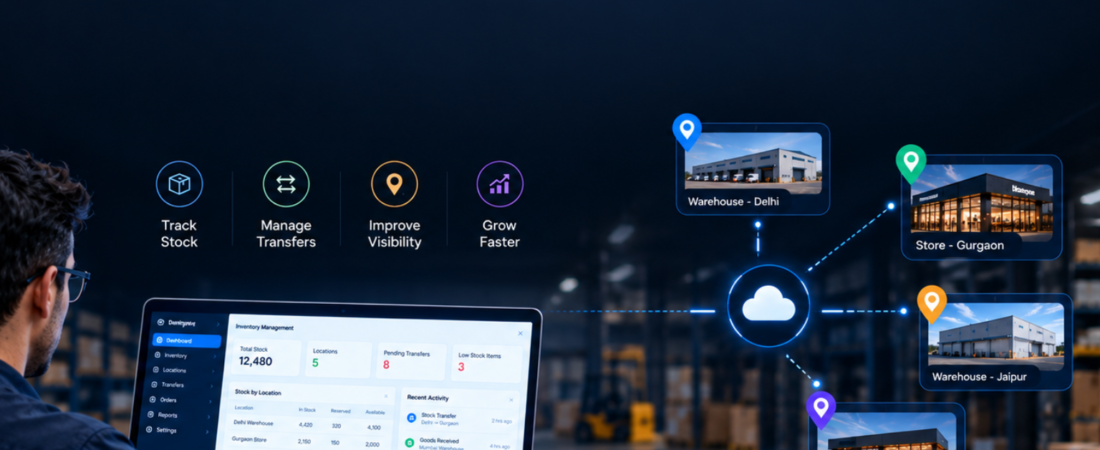
Managing inventory becomes more complicated when a business operates from multiple stores, warehouses, branches or distribution centers. Multi-location inventory management helps businesses track stock across different locations, monitor availability, manage transfers and maintain better control over inventory from a centralized system.
When teams manage each location separately through spreadsheets, phone calls or disconnected software, businesses can struggle to know how much stock they actually have and where it is available. A centralized inventory management system from apps4growth can bring these activities together and give business owners a clearer view of stock across all locations.
Why Is Multi-Location Inventory Management Difficult?
Managing one warehouse is relatively straightforward. The challenge increases when a business adds more branches or warehouses.
Each location may have different stock levels, customer demand, sales volumes and replenishment requirements. At the same time, inventory can move from one location to another to fulfill orders or balance stock.
Common challenges include:
- Different stock levels at different locations
- Difficulty tracking stock transfers
- Overstocking at one location and shortages at another
- Delayed inventory updates
- Manual spreadsheet management
- Limited visibility into available stock
- Difficulty coordinating warehouses and branches
- Duplicate or inaccurate inventory records
- Problems with order fulfillment
- Time-consuming stock reconciliation
Without centralized visibility, managers may spend unnecessary time asking individual teams for stock updates.
How Can I Manage Inventory Across Multiple Locations?
The most effective approach is to connect all locations through a centralized inventory management system.
Instead of maintaining separate records for every warehouse or store, businesses can maintain location-wise inventory information within one platform. Managers can then view stock availability, monitor movement and make decisions using updated information.
Here are some practical ways to improve multi-location inventory management.
1. Create Separate Inventory Records for Each Location
Start by defining every warehouse, store, branch or distribution center within the system.
Each location should have its own inventory records while remaining connected to the central database. This makes it easier to identify where specific products are available.
For example, a business operating warehouses in Delhi, Gurgaon and Jaipur can view the available stock at each location without maintaining three disconnected systems.
2. Track Stock in Real Time
Inventory information needs regular updates as products enter, leave or move between locations.
A digital inventory system can update stock when teams receive goods, complete sales, process returns or transfer products between warehouses.
Real-time inventory tracking gives managers better visibility and reduces dependence on manual stock reports.
3. Manage Stock Transfers Between Locations
Businesses often need to move products from one location to another.
A proper stock transfer process should record:
- Source location
- Destination location
- Products being transferred
- Quantity
- Transfer date
- Transfer status
- Person responsible
- Received quantity
This creates a clear record of inventory movement and helps reduce discrepancies.
4. Set Location-Wise Stock Levels
Every location may require different stock quantities.
A busy retail store may need more stock than a smaller branch. Similarly, a warehouse serving a high-demand region may require larger inventory levels.
Businesses can define minimum and maximum stock levels for individual locations. When inventory reaches a predefined threshold, the team can plan replenishment before a shortage affects sales.
5. Monitor Low-Stock Items
Low-stock alerts can help businesses identify products that require attention.
Instead of checking spreadsheets manually, managers can receive alerts when inventory falls below the desired level.
This becomes especially useful when a company manages hundreds or thousands of products across several locations.
6. Improve Order Fulfillment
A centralized inventory system can help businesses identify which location has the required product before processing an order.
For example, if a customer places an order for a product, the business can check availability across different warehouses and select the most suitable location for fulfillment.
This can help reduce unnecessary transfers and improve order processing.
7. Keep Product Information Consistent
Businesses should maintain consistent product names, SKUs, units, categories and specifications across all locations.
Without standard product information, different branches may create duplicate records or use different names for the same product.
A centralized system helps maintain a common product database across the organization.
8. Track Inventory Movement and History
Knowing the current stock level is important, but businesses also need to understand how inventory moved over time.
An inventory management system can maintain records of:
- Purchases
- Sales
- Returns
- Stock transfers
- Adjustments
- Damaged goods
- Stock receipts
- Dispatches
This history helps managers investigate discrepancies and understand inventory patterns.
What Features Should Multi-Location Inventory Software Have?
A good multi-location inventory management software solution should support the actual requirements of a growing business.
Important features can include:
Centralized Inventory Dashboard
Managers can view stock information across warehouses, stores and branches from one dashboard.
Location-Wise Stock Tracking
The system should show how much stock each location currently holds.
Stock Transfer Management
Teams can create, approve and track transfers between locations.
Purchase and Stock Receiving
Businesses can record incoming inventory and update the appropriate location automatically.
Sales and Order Integration
Sales should automatically reflect in inventory records so teams can maintain accurate stock levels.
Low-Stock Alerts
The system can notify users when products fall below predefined stock levels.
Barcode or SKU Management
Barcodes and SKUs can make product identification and stock updates faster.
Inventory Reports
Managers can review stock levels, movement, transfers, fast-moving products, slow-moving products and other important metrics.
User and Location Permissions
Businesses can control which employees can view or modify inventory information for specific locations.
Can Multi-Location Inventory Software Reduce Stock Problems?
Yes. A centralized system can help reduce several common inventory problems by giving businesses better visibility and control.
For example, managers can identify excess stock at one location and shortages at another. They can then plan a stock transfer instead of placing an unnecessary new purchase order.
Similarly, accurate inventory information can help sales teams avoid promising products that are not actually available.
The goal is not simply to maintain more inventory. It is to maintain the right inventory at the right location at the right time.
Multi-Location Inventory Management for Growing Businesses
As a business expands, inventory management often becomes more complex.
A company may begin with one warehouse and later add retail stores, regional warehouses, distributors or fulfillment centers. The inventory system needs to support this growth without creating disconnected processes.
A scalable multi-location inventory management system can connect these locations and provide centralized visibility while allowing each location to manage its daily activities.
This approach can benefit:
- Retail businesses
- Wholesale businesses
- Distributors
- Manufacturers
- E-commerce companies
- Consumer goods businesses
- Pharmaceutical businesses
- Electronics businesses
- Automotive businesses
- Businesses with regional warehouses
Should You Use Custom Inventory Management Software?
Every business manages inventory differently. Some companies operate multiple warehouses, while others manage stores, distributors and fulfillment centers together.
Ready-made inventory software can provide standard inventory features, but businesses with complex workflows may need a more tailored solution.
Custom inventory management software can support specific requirements such as:
- Multiple warehouses
- Multiple retail locations
- Custom stock transfer workflows
- Location-specific pricing
- Approval processes
- Custom inventory reports
- Existing ERP or CRM integration
- Barcode systems
- Supplier management
- Order management
- Business-specific stock rules
Before choosing a solution, businesses should understand their current inventory workflow and identify the processes they want to automate.
How Can apps4growth Help?
Businesses that want to manage inventory across multiple locations can use digital solutions to bring stock, orders, transfers and inventory information into one connected workflow.
apps4growth can help businesses build software around their inventory requirements, whether they need centralized stock visibility, location-wise tracking, automated workflows, inventory reporting or integration with other business operations.
The right solution can help teams spend less time maintaining separate records and more time managing inventory efficiently.
Best Practices for Multi-Location Inventory Management
Technology can improve inventory management, but businesses should also establish clear operational processes.
Some useful practices include:
- Maintain accurate product and SKU information
- Set minimum and maximum stock levels
- Conduct regular inventory audits
- Track every stock transfer
- Standardize receiving and dispatch processes
- Monitor slow-moving and fast-moving products
- Review inventory reports regularly
- Give employees appropriate system permissions
- Train teams on inventory processes
- Keep inventory data updated across locations
Combining clear processes with the right technology can create a more reliable inventory management system.
Final Thoughts
Managing inventory across multiple locations requires more than keeping separate stock records for every warehouse or branch. Businesses need a connected system that shows where inventory is available, how products move between locations and when teams need to replenish stock.
Multi-location inventory management can help businesses improve stock visibility, coordinate transfers, reduce manual work and support better order fulfillment.
As operations grow, a centralized inventory management system can provide the structure businesses need to manage multiple locations more efficiently. The right solution should match the company’s products, locations, order volume, workflows and future growth plans.
Frequently Asked Questions
What is multi-location inventory management?
Multi-location inventory management is the process of tracking and controlling inventory across multiple warehouses, stores, branches or distribution centers through connected inventory processes or software.
Why is multi-location inventory management important?
It helps businesses maintain better visibility of stock across locations, manage transfers, reduce shortages and overstocking, and improve order fulfillment.
What is multi-location inventory management software?
It is software that allows businesses to manage inventory across multiple locations from a centralized platform while tracking stock levels, transfers, orders, receipts and inventory movement.
Can I manage multiple warehouses with one inventory system?
Yes. A centralized inventory management system can connect multiple warehouses and allow businesses to monitor location-wise stock from one platform.
Can inventory software track stock transfers?
Yes. Inventory software can record the source location, destination location, products, quantities and transfer status to help businesses maintain accurate inventory movement records.
Is custom inventory management software useful for growing businesses?
Custom inventory management software can be useful when a business has specific workflows, multiple locations, complex stock rules or integration requirements that standard software does not fully support.